Smart Search AI

From knowledge chaos to governed clarity

Outdated policies. Duplicate procedures. Conflicting procedures no one caught. Smart Search AI reads selected knowledge documents across your systems, filters out what's not relevant, and allows for governance over employee queries.

SharePoint OneDrive Confluence Google Drive ServiceNow JIRA Answers in Teams & Slack

Your content today

OUTDATED
DUPLICATE
CONFLICT
STALE
UNREVIEWED
ORPHANED
SMART SEARCH AI

Governed answers

PTO Policy 2026

HR Wiki

Benefits Summary

HR Portal

Expense Guidelines

Finance

Trusted by global leaders, supporting employees in over 50 countries

The problem

Every enterprise accumulates content debt

Outdated policies, procedures, knowledge articles, and more. The longer it sits, the harder it gets to clean up.

Two documents contradict each other

The AI picks one. Nobody finds out which, or why, until an employee acts on it.

A policy hasn't been touched since 2019

It gets served anyway, in the same authoritative tone as everything else.

Three benefits summaries, all slightly different

Ask about dental coverage and the answer becomes a coin flip.

Launching an AI Assistant using bad content delivers bad answers to employee queries.
Smart Search

Smart Search AI is custom configured to know what you want and to leave behind what's not needed or relevant.

Most tools ingest all your content; the good and the bad. Smart Search AI Agents are custom configured to know what you want and leave behind what's not needed or relevant.

1

Connect

Point Smart Search AI at the systems where your knowledge already lives (SharePoint, OneDrive, Confluence, Google Drive, ServiceNow, JIRA, and more). Nothing moves or migrates.

2

Configure the agent

You give the agent a detailed prompt that tells it exactly what to do: which types of documents to seek out, and which to ignore.

3

Classify what syncs

Once the right documents are in your hub, you decide how each one is used.

Clean knowledge in. Trusted answers out.

How it works

Five steps to governed Content Management you control

Sync your company knowledge to information your employees need, with trust and confidence.

1

Connect

Point Smart Search AI Agents to your content systems. Secure, read-only integration with no migration.

2

Curate

Agents filter documents, based on your business needs, as relevant or rejected.

3

Govern

Your team decides how each document is used, to generate guard railed answers or answers with sources cited.

4

Delivery & Feedback

Employees ask questions in Teams, Slack or web chat and get accurate answers instantly. Their feedback flows back to admins, for continuous improvements.

5

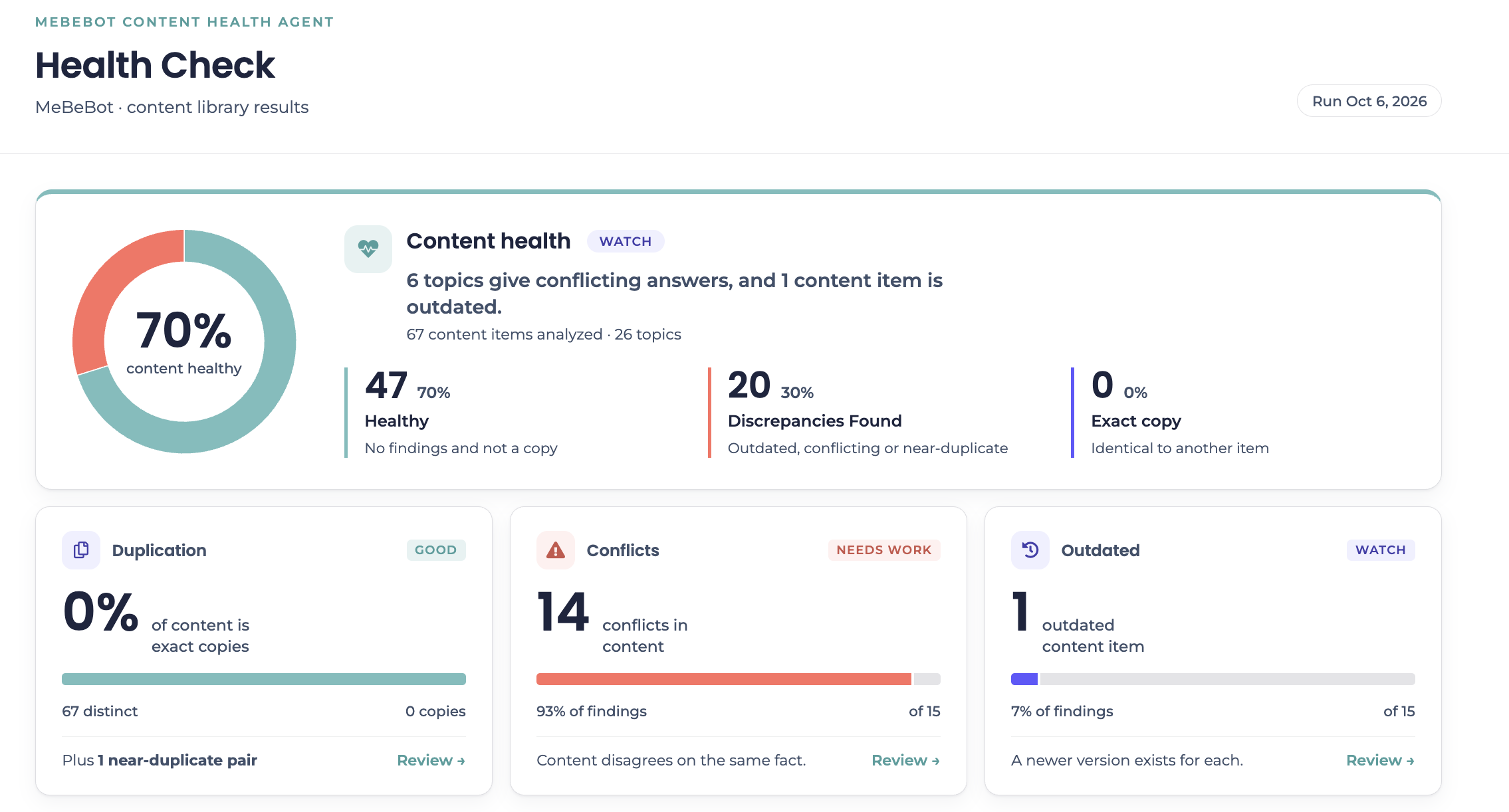
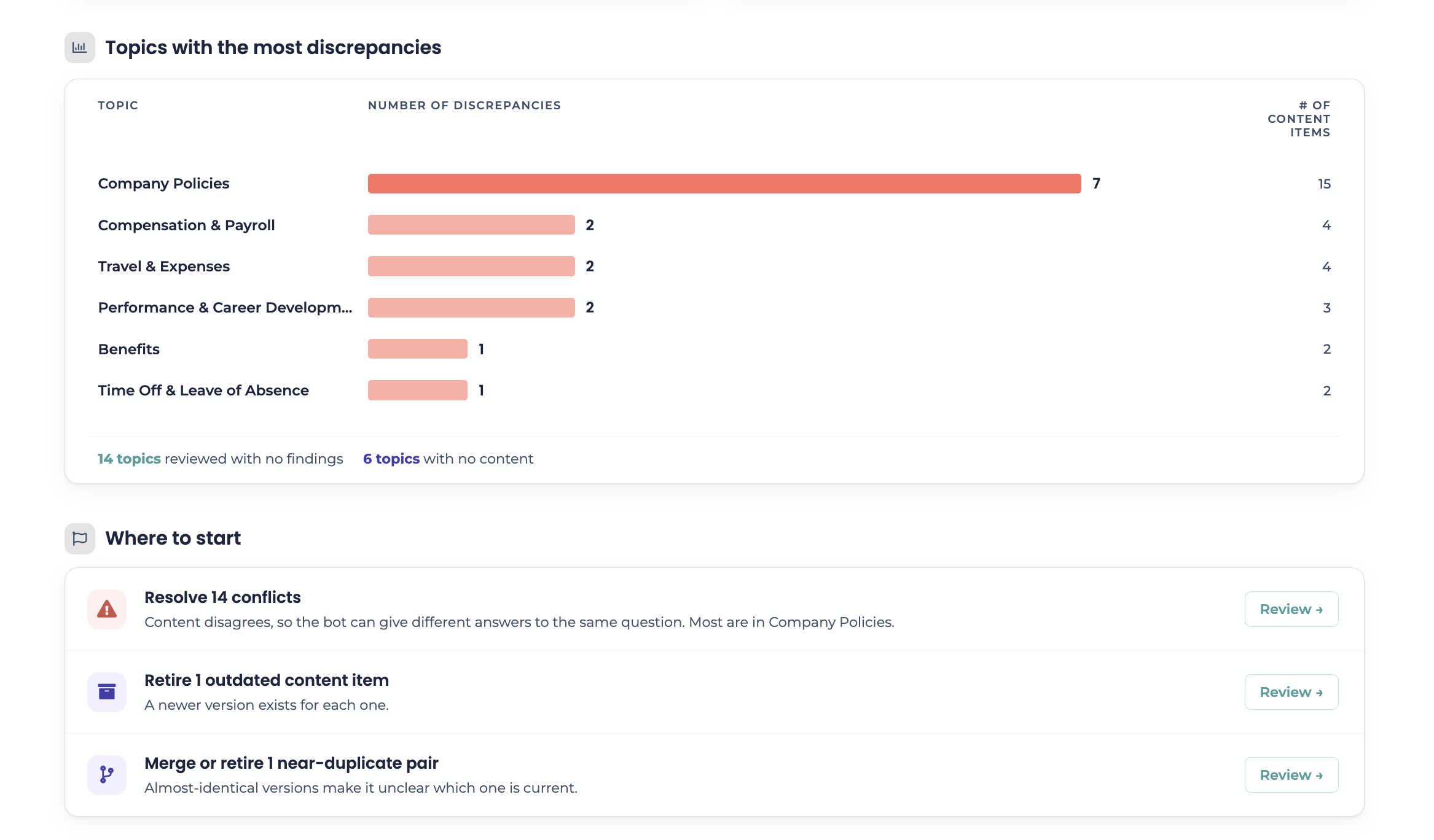
Health Report

Content documents are identified for inaccuracies and specific fixes are identified.

See it in action

Watch Smart Search in action

See how Smart Search AI reads, filters, and governs your knowledge library to deliver trusted answers every time.
Smart Search AI Demo
Why it's different

General AI reads everything. Smart Search curates first.

General AI Assistants read all content in your knowledge systems (do you know what's out there?). Smart Search AI filters out content that's outdated, duplicated, or irrelevant to employees.

General AI

SharePoint
OUTDATED
DUPLICATE
OneDrive
CONFLICT
STALE
Confluence
ORPHANED
UNREVIEWED
AI

Higher cost. Wrong answers slip through.

Everything in the library is fair game for an answer, including the parts you'd never approve.

Smart Search AI

RECENCY
OWNERSHIP
RELEVANCE
GOVERNANCE

Lower cost. Only approved answers.

Only content that clears all four filters can reach an employee, and your team decides what clears.

Clean knowledge in. Trusted answers out.

Stop letting your messiest documents answer your people

See how Smart Search AI reads, filters, and governs your entire knowledge library in one pass.